
Getting Started with ASP.NET Core Web API - Required Field Validation
TLDR
- For value types such as
Boolean, you should useNullabletypes combined with the[Required]attribute to implement required field validation. [BindRequired]only applies to Form Data and does not apply to JSON/XML data in[FromBody].- To resolve issues where Create and Update share a DTO but have different validation logic, you can implement a custom
RequiredForTypeAttribute. - When using custom validation attributes, you must also implement
ISchemaFilterto synchronize the Swagger documentation, ensuring the API documentation correctly displays the required status.
Differences and Limitations of [Required] and [BindRequired]
In ASP.NET Core, during data binding, if a parameter is not found in the source, the system assigns it a default value. For struct types (e.g., Boolean), the default value (false) makes it impossible to determine whether the user "did not provide a value" or "provided false."
When you might encounter this issue
When you use [FromBody] to receive JSON data, and your model contains value types like bool, and you want to force the frontend to provide that field.
Solution
For [FromBody] scenarios, it is recommended to declare the property as a Nullable type and use it with [Required]:
public class Input {
    [Required]
    public bool? IsRequired { get; set; }
}Notes
The [BindRequired] attribute only applies to data binding from forms. According to official documentation, it does not apply to JSON or XML data in the Request Body, as the latter is handled by Input Formatters.
Handling Shared DTO Validation for Create and Update
In practical development, you often encounter situations where Create and Update share a DTO, but the required field logic for both may differ (e.g., some fields are optional during Update).
When you might encounter this issue
When an Update DTO inherits from a Create DTO, but you want to relax the [Required] restrictions on certain fields in the Update scenario.
Solution: Custom RequiredForTypeAttribute
Since the Inherited property of an Attribute only applies to Classes and Methods, and not to Properties, you can use a custom validation attribute to determine the current validation context:
[AttributeUsage(AttributeTargets.Property | AttributeTargets.Field | AttributeTargets.Parameter, AllowMultiple = false)]
public class RequiredForTypeAttribute : RequiredAttribute {
    public Type[] TargetTypes { get; set; }

    public RequiredForTypeAttribute(params Type[] targetTypes) {
        TargetTypes = targetTypes ?? throw new ArgumentNullException(nameof(targetTypes));
    }

    protected override ValidationResult IsValid(object value, ValidationContext validationContext) {
        if (!TargetTypes.Contains(validationContext.ObjectType) || IsValid(value)) {
            return ValidationResult.Success;
        }

        string[] memberNames = validationContext.MemberName != null ? new string[] { validationContext.MemberName } : null;
        return new ValidationResult(FormatErrorMessage(validationContext.DisplayName), memberNames);
    }
}Usage is as follows:
public class CreateInput {
    [RequiredForType(typeof(CreateInput))]
    public bool? IsRequired { get; set; }
}

public class UpdateInput : CreateInput { }Swagger Documentation Synchronization
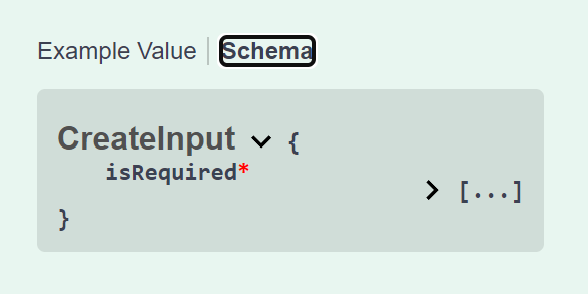
Since [Required] affects the Swagger Schema display, if you use the custom attribute above, you must implement ISchemaFilter to manually correct the required field markers in the Swagger documentation:
public class RequiredForTypeSchemaFilter : ISchemaFilter {
    public void Apply(OpenApiSchema schema, SchemaFilterContext context) {
        if (schema.Properties is null) return;

        foreach (PropertyInfo prop in context.Type.GetProperties()) {
            RequiredForTypeAttribute attr = prop.GetCustomAttributes<RequiredForTypeAttribute>().FirstOrDefault();

            if (attr is not null && !attr.TargetTypes.Contains(context.Type)) {
                foreach (var schemaPropPair in schema.Properties) {
                    if (string.Equals(schemaPropPair.Key, prop.Name, StringComparison.OrdinalIgnoreCase)) {
                        schema.Required.Remove(schemaPropPair.Key);
                        break;
                    }
                }
            }
        }
    }
}
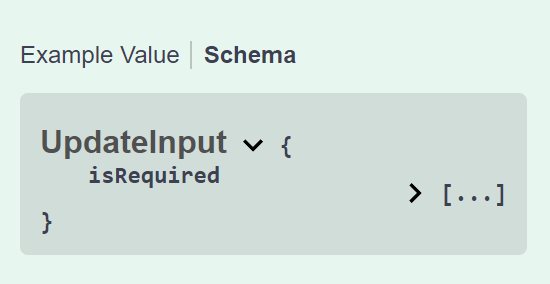
Change Log
- 2024-04-13 Initial version created.